

What it posts
On the schedule you pick, PRFlow posts a summary of every open PR routed to a Slack channel, from GitLab and GitHub alike. Each line links the PR and shows why it is still open, how old it is, and who wrote it. PRs are sorted into three groups:- 🔴 Needs attention: failing CI, merge conflicts, changes requested, unresolved discussions, or a blocked merge
- 🟡 Waiting on review: approvals missing or CI still running
- 🟢 Ready to merge: approved and green
Turning it on
The digest lives inside the notification rule that posts to the channel. On the dashboard, open the rule’s editor — Edit on an existing rule, or while creating one — and switch on Scheduled digest. The schedule, filter, and delivery settings unfold below the toggle.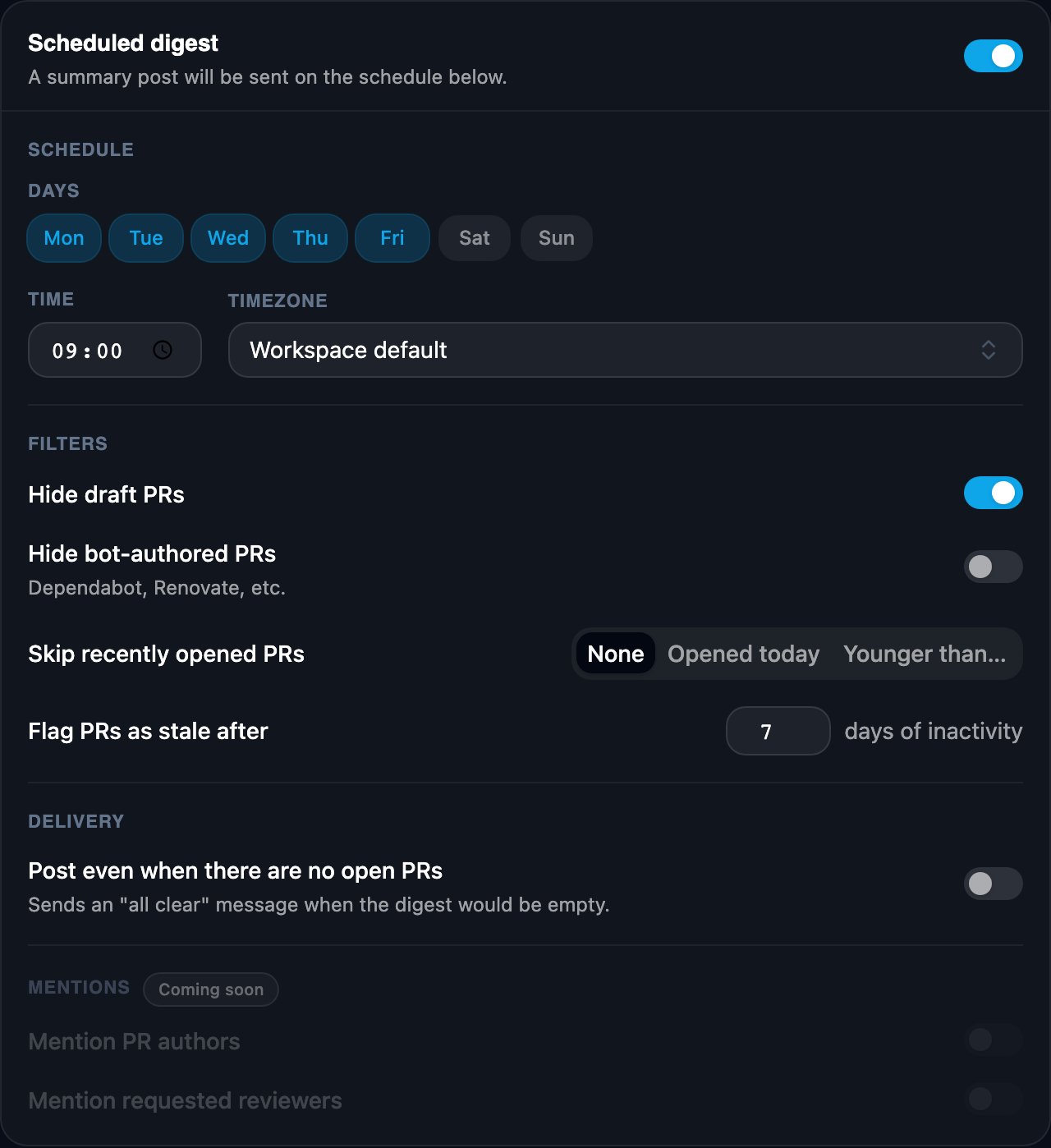
Settings
- Schedule: the days and time of day the digest posts. The timezone defaults to your workspace setting and can be overridden per channel.
- Filters: hide draft PRs (independent of the rule’s Draft PRs switch), hide bot-authored PRs (Dependabot, Renovate, and similar), and skip recently opened PRs, either anything opened today or anything younger than a number of hours or days. Flag PRs as stale sets how many days of inactivity earn the 🚨 marker.
- Delivery: an empty digest is skipped by default. Turn on Post even when there are no open PRs to get a short all-clear message instead.