> ## Documentation Index
> Fetch the complete documentation index at: https://docs.prflow.dev/llms.txt
> Use this file to discover all available pages before exploring further.
# GitHub integration
> How PRFlow connects to GitHub through a one-click GitHub App, which pull request events it reacts to, and what it sends to Slack.
## Overview
PRFlow delivers GitHub pull request notifications to Slack. For each pull
request it posts **one Slack message that updates in place** as the PR
progresses — CI check status, reviews, and merge state all appear on the
original message, and PR comments are synced into a Slack thread under it.
Unlike the [GitLab integration](/gitlab-integration), there is nothing to
configure on the GitHub side beyond installing the **PRFlow GitHub App**:
the App delivers webhook events automatically and grants PRFlow its
(read-only) API access in one step. PRFlow works with **github.com**
organizations and personal accounts; GitHub Enterprise Server is not
supported.
## Setup
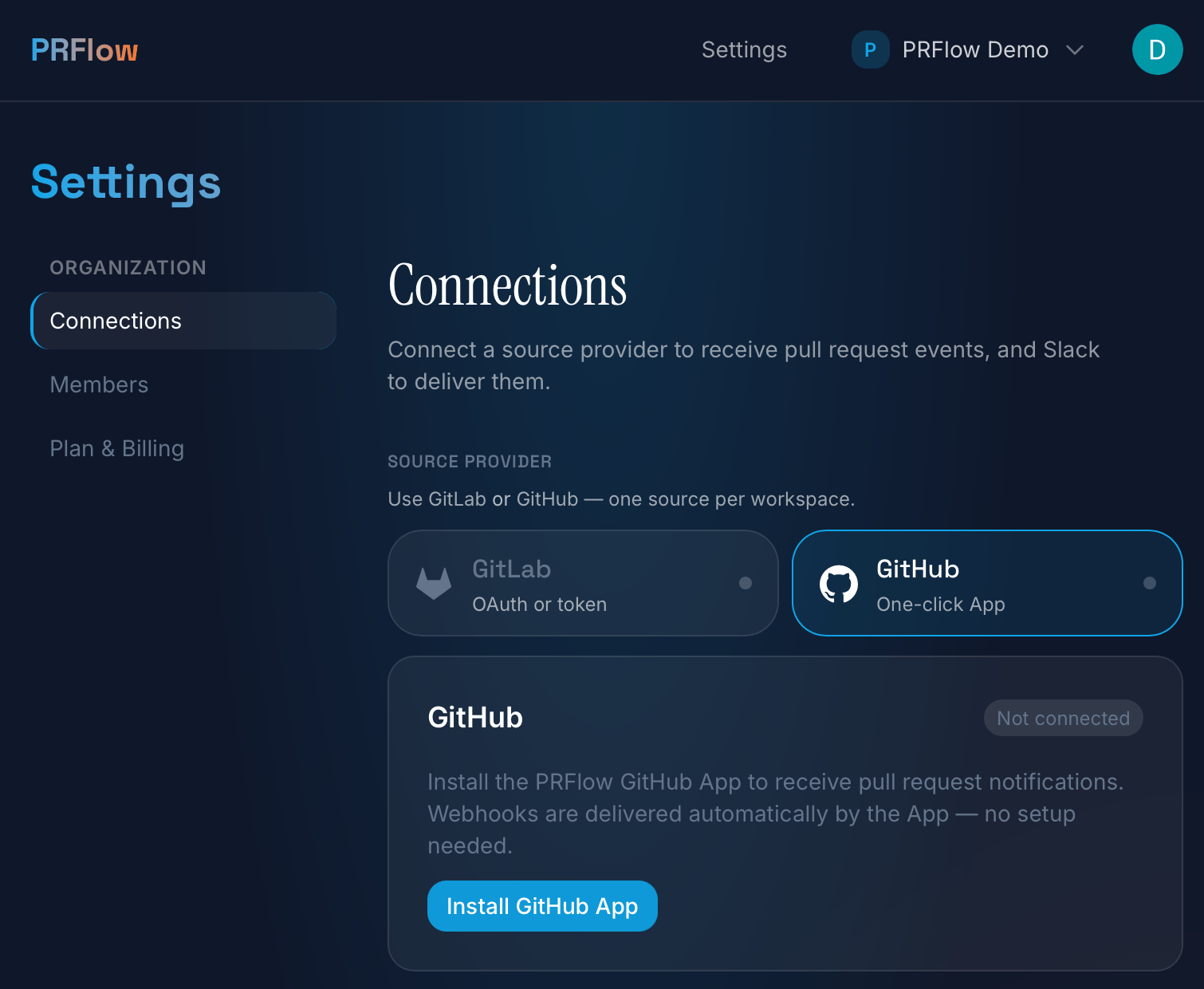 1. In PRFlow, open **Settings → Connections** and select **GitHub** as the
source provider. A workspace connects one source provider — GitHub or
GitLab, not both at once.
2. Click **Install GitHub App**. GitHub asks you to pick the account or
organization and which repositories the App may see (all, or a selected
list), and shows the read-only permissions it requests.
3. Back in PRFlow, connect Slack if you haven't yet, then map repositories
to Slack channels from the dashboard.
That's the whole setup — no webhook URLs, no secrets to paste. You can
change the repository selection any time from GitHub's App settings; PRFlow
picks the change up automatically.
## How it works
### Events PRFlow reacts to
The GitHub App subscribes to pull request activity. Events for repositories
you haven't mapped to a Slack channel are acknowledged and discarded.
| Event | What PRFlow does |
| ---------------------------------------------- | --------------------------------------------------------------------------------------------------------------------------------------------------------------------------------------------------------------------------------------------------------- |
| `pull_request` | `opened`, `reopened`, and `ready_for_review` post the PR message; `edited`, `synchronize`, `review_requested`, and `converted_to_draft` update it in place; `closed` marks the PR merged or closed. Other actions (labeled, assigned, …) are ignored. |
| `pull_request_review` | A submitted review updates the message's review state — **approved** or **changes requested**. |
| `issue_comment`, `pull_request_review_comment` | Conversation comments on a PR and inline review comments on the diff are posted as threaded replies under the PR message. Edited comments are updated in place; deleted comments are removed from the Slack thread. Comments on plain issues are ignored. |
| `check_suite` / `check_run` | Update the CI status shown on the PR message, aggregated across check suites — GitHub Actions and any other check provider. Only the newest run of each check counts, so a re-run that passes flips the card to ✅ even if an earlier run failed. |
| `installation`, `installation_repositories` | Track the App's lifecycle: installing, uninstalling, and changing the repository selection. Uninstalling the App from GitHub cleanly disconnects the integration. |
### Slack message model
The Slack side is identical to the GitLab integration: a 1:1 mapping between
a pull request and a Slack message, updated in place via `chat.update`, with
merge-requirement rows that flip from 🔴 to 🟢 as CI, approvals, and
mergeability are satisfied. On GitHub the merge requirements are read from
the repository's **branch rulesets**; repositories using classic branch
protection (which the App's read-only permissions cannot inspect) get a
conservative fallback that never overstates what is required.
**Comment sync**: each PR comment becomes a threaded reply under the PR
message, quoting the comment text (truncated to 500 characters) with the
commenter's username. Comment edits on GitHub update the existing thread
reply; comment deletions remove it. Comment bodies are not stored — PRFlow
keeps only the comment ID and the Slack message reference so it can edit or
delete the reply later.
## Permissions & data
The App requests three **read-only** permissions:
| Permission | Why PRFlow needs it |
| ------------------- | ----------------------------------------------------------------------------------------------- |
| Pull requests: read | PR metadata for notifications, and review state when rendering the message. |
| Checks: read | CI status from check suites and check runs. |
| Metadata: read | Repository names for the repository picker, and branch rulesets for the merge-requirement rows. |
PRFlow has no write access and no Contents permission, so it cannot read
repository code or diffs, and it cannot modify anything on GitHub. Every
webhook delivery is signature-verified (`X-Hub-Signature-256`) before it is
processed. As with GitLab, only pull request, review, comment, and check
metadata is handled — see the GitLab page's
[data handling section](/gitlab-integration#data-handling) for the storage
and Slack-delivery details, which apply equally here.
## Disconnecting
Either side works: **Disconnect** on the PRFlow Connections page removes the
integration and every repository tracked under it (it does not uninstall the
App on GitHub's side), or uninstall the App from GitHub's settings and
PRFlow disconnects automatically.
## Support
Questions about the integration or a notification that didn't arrive? Email
[hello@prflow.dev](mailto:hello@prflow.dev) and we'll get you sorted.
1. In PRFlow, open **Settings → Connections** and select **GitHub** as the
source provider. A workspace connects one source provider — GitHub or
GitLab, not both at once.
2. Click **Install GitHub App**. GitHub asks you to pick the account or
organization and which repositories the App may see (all, or a selected
list), and shows the read-only permissions it requests.
3. Back in PRFlow, connect Slack if you haven't yet, then map repositories
to Slack channels from the dashboard.
That's the whole setup — no webhook URLs, no secrets to paste. You can
change the repository selection any time from GitHub's App settings; PRFlow
picks the change up automatically.
## How it works
### Events PRFlow reacts to
The GitHub App subscribes to pull request activity. Events for repositories
you haven't mapped to a Slack channel are acknowledged and discarded.
| Event | What PRFlow does |
| ---------------------------------------------- | --------------------------------------------------------------------------------------------------------------------------------------------------------------------------------------------------------------------------------------------------------- |
| `pull_request` | `opened`, `reopened`, and `ready_for_review` post the PR message; `edited`, `synchronize`, `review_requested`, and `converted_to_draft` update it in place; `closed` marks the PR merged or closed. Other actions (labeled, assigned, …) are ignored. |
| `pull_request_review` | A submitted review updates the message's review state — **approved** or **changes requested**. |
| `issue_comment`, `pull_request_review_comment` | Conversation comments on a PR and inline review comments on the diff are posted as threaded replies under the PR message. Edited comments are updated in place; deleted comments are removed from the Slack thread. Comments on plain issues are ignored. |
| `check_suite` / `check_run` | Update the CI status shown on the PR message, aggregated across check suites — GitHub Actions and any other check provider. Only the newest run of each check counts, so a re-run that passes flips the card to ✅ even if an earlier run failed. |
| `installation`, `installation_repositories` | Track the App's lifecycle: installing, uninstalling, and changing the repository selection. Uninstalling the App from GitHub cleanly disconnects the integration. |
### Slack message model
The Slack side is identical to the GitLab integration: a 1:1 mapping between
a pull request and a Slack message, updated in place via `chat.update`, with
merge-requirement rows that flip from 🔴 to 🟢 as CI, approvals, and
mergeability are satisfied. On GitHub the merge requirements are read from
the repository's **branch rulesets**; repositories using classic branch
protection (which the App's read-only permissions cannot inspect) get a
conservative fallback that never overstates what is required.
**Comment sync**: each PR comment becomes a threaded reply under the PR
message, quoting the comment text (truncated to 500 characters) with the
commenter's username. Comment edits on GitHub update the existing thread
reply; comment deletions remove it. Comment bodies are not stored — PRFlow
keeps only the comment ID and the Slack message reference so it can edit or
delete the reply later.
## Permissions & data
The App requests three **read-only** permissions:
| Permission | Why PRFlow needs it |
| ------------------- | ----------------------------------------------------------------------------------------------- |
| Pull requests: read | PR metadata for notifications, and review state when rendering the message. |
| Checks: read | CI status from check suites and check runs. |
| Metadata: read | Repository names for the repository picker, and branch rulesets for the merge-requirement rows. |
PRFlow has no write access and no Contents permission, so it cannot read
repository code or diffs, and it cannot modify anything on GitHub. Every
webhook delivery is signature-verified (`X-Hub-Signature-256`) before it is
processed. As with GitLab, only pull request, review, comment, and check
metadata is handled — see the GitLab page's
[data handling section](/gitlab-integration#data-handling) for the storage
and Slack-delivery details, which apply equally here.
## Disconnecting
Either side works: **Disconnect** on the PRFlow Connections page removes the
integration and every repository tracked under it (it does not uninstall the
App on GitHub's side), or uninstall the App from GitHub's settings and
PRFlow disconnects automatically.
## Support
Questions about the integration or a notification that didn't arrive? Email
[hello@prflow.dev](mailto:hello@prflow.dev) and we'll get you sorted.