> ## Documentation Index
> Fetch the complete documentation index at: https://docs.prflow.dev/llms.txt
> Use this file to discover all available pages before exploring further.
# Comment sync
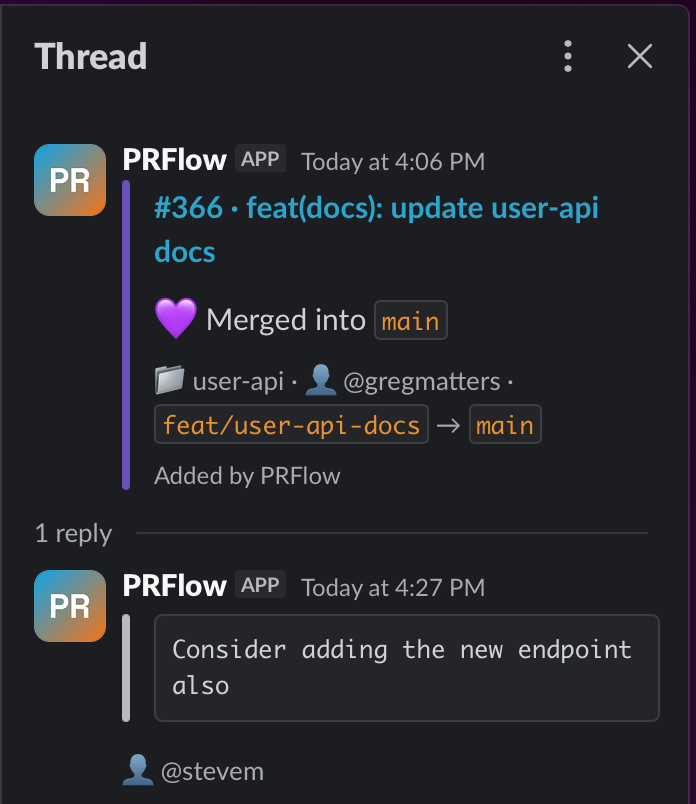
> Review comments on GitLab merge requests and GitHub pull requests appear as threaded replies under the Slack notification — new comments post to the thread, edits update in place, and deletions remove the reply.
PRFlow keeps one Slack message per merge request and updates it in place as
the MR progresses. **Comment sync** does the same for the review
conversation: every comment on the MR becomes a threaded reply under that
message, so the Slack thread mirrors the discussion as it happens.
 Reviewers keep commenting where they always have — in GitLab or GitHub — and
teammates who live in Slack follow the whole conversation from the thread.
The channel itself stays clean: comments only ever go to the thread, never
posted as separate channel messages.
## How it works
Each synced comment is a threaded reply that quotes the comment text (up to
500 characters) and attributes it to the commenter's GitLab or GitHub
username. The thread stays in step with the source:
| When someone… | …the Slack thread |
| ----------------- | ---------------------------------------- |
| posts a comment | gets a new reply under the MR message |
| edits a comment | shows the new text on the existing reply |
| deletes a comment | has that reply removed |
Sync is one-way, from GitLab/GitHub into Slack. PRFlow has read-only access
to your code platform, so replying in the Slack thread does not post
anything back to the merge request.
## What gets synced
**GitLab** — comments on merge requests, both general comments and inline
diff comments. Notes on issues, commits, and snippets are ignored. Comments
arrive via the `Note Hook` webhook, and PRFlow's polling fallback catches
comments a missed webhook delivery would have dropped.
**GitHub** — pull request comments from the Conversation tab and inline
review comments on the diff. Comments on plain issues are ignored. When a
reviewer submits a review, each inline comment in it is synced to the
thread; the review's approve / request-changes outcome updates the PR
message itself rather than the thread, and the review's summary paragraph is
not synced.
## Good to know
* **Comments need a parent message.** If an MR has no Slack message — for
example, the project was connected to PRFlow after the MR was opened, or
the comment was made while the MR was still a draft — the comment is not
posted, and it is not posted retroactively.
* **Exactly one reply per comment.** Duplicate or concurrently delivered
webhook events never produce a second reply for the same comment.
* **Comment bodies are never stored.** PRFlow keeps only the comment ID and
a reference to the Slack reply so it can update or remove it later; the
comment text itself passes through to Slack and lives there. See
[data handling](/gitlab-integration#data-handling) for the full picture.
## Setup
There is nothing to configure — comment sync is on for every project you
[map to a Slack channel](/channel-routing), on every plan. New to PRFlow?
Start with the [quickstart](/quickstart).
Webhook events, API calls, data handling, and security details.
The one-click GitHub App: events, permissions, and setup.
Questions? Reach us at [hello@prflow.dev](mailto:hello@prflow.dev).
Reviewers keep commenting where they always have — in GitLab or GitHub — and
teammates who live in Slack follow the whole conversation from the thread.
The channel itself stays clean: comments only ever go to the thread, never
posted as separate channel messages.
## How it works
Each synced comment is a threaded reply that quotes the comment text (up to
500 characters) and attributes it to the commenter's GitLab or GitHub
username. The thread stays in step with the source:
| When someone… | …the Slack thread |
| ----------------- | ---------------------------------------- |
| posts a comment | gets a new reply under the MR message |
| edits a comment | shows the new text on the existing reply |
| deletes a comment | has that reply removed |
Sync is one-way, from GitLab/GitHub into Slack. PRFlow has read-only access
to your code platform, so replying in the Slack thread does not post
anything back to the merge request.
## What gets synced
**GitLab** — comments on merge requests, both general comments and inline
diff comments. Notes on issues, commits, and snippets are ignored. Comments
arrive via the `Note Hook` webhook, and PRFlow's polling fallback catches
comments a missed webhook delivery would have dropped.
**GitHub** — pull request comments from the Conversation tab and inline
review comments on the diff. Comments on plain issues are ignored. When a
reviewer submits a review, each inline comment in it is synced to the
thread; the review's approve / request-changes outcome updates the PR
message itself rather than the thread, and the review's summary paragraph is
not synced.
## Good to know
* **Comments need a parent message.** If an MR has no Slack message — for
example, the project was connected to PRFlow after the MR was opened, or
the comment was made while the MR was still a draft — the comment is not
posted, and it is not posted retroactively.
* **Exactly one reply per comment.** Duplicate or concurrently delivered
webhook events never produce a second reply for the same comment.
* **Comment bodies are never stored.** PRFlow keeps only the comment ID and
a reference to the Slack reply so it can update or remove it later; the
comment text itself passes through to Slack and lives there. See
[data handling](/gitlab-integration#data-handling) for the full picture.
## Setup
There is nothing to configure — comment sync is on for every project you
[map to a Slack channel](/channel-routing), on every plan. New to PRFlow?
Start with the [quickstart](/quickstart).
Webhook events, API calls, data handling, and security details.
The one-click GitHub App: events, permissions, and setup.
Questions? Reach us at [hello@prflow.dev](mailto:hello@prflow.dev).